For the complete documentation index, see llms.txt. Markdown versions of all docs pages are available by appending .md to any docs URL.
OTel stack
Deploy an open source observability stack based on OpenTelemetry (OTel) that includes the following components:
- Logs: Centralized log collection and storage with Grafana Loki.
- Traces: Distributed tracing with Grafana Tempo.
- Metrics: Time-series metrics collection with Prometheus.
- Collection: Unified telemetry collection with OpenTelemetry Collector.
- Visualization: Comprehensive dashboards with Grafana.
About
Observability tools are essential to gain insight into the health and performance of your gateway proxies. OpenTelemetry (OTel) is a flexible, open source framework that provides a set of APIs, libraries, and instrumentation to help capture and export observability data. However, you can follow a similar process as this guide to use the tools that you prefer.
Observability data types
Observability is built on three core pillars as described in the following table. By combining these three data types, you get a complete picture of your system’s health and performance.
| Pillar | Description |
|---|---|
| Logs | Discrete events that happen at a specific time with detailed context. |
| Metrics | Numerical measurements aggregated over time intervals. |
| Traces | Records of requests as they flow through distributed systems. |
Architecture
Review the following diagram to understand the architecture of the observability stack.
The gateway proxy acts as the primary telemetry generator, while the OTel Collectors serve as the central routing hub for all observability data.
    flowchart TD
    A["1- Application Traffic"] --> B["2- Gateway proxy"]
    B --> C["3- OTel Collectors"]
    C --> D["4- Storage Backends"]
    D --> D1["Logs (Loki)"]
    D --> D2["Traces (Tempo)"]
    D --> D3["Metrics (Prometheus)"]
    D1 --> E["5- Visualization (Grafana)"]
    D2 --> E
    D3 --> E
Architecture data flow:
- Application Traffic: Applications send requests to the gateway proxy.
- Gateway Processing: The gateway proxy processes requests and generates telemetry data in the form of logs, traces, and metrics.
- Telemetry Collection: The OTel Collectors receive telemetry data from the gateway proxy.
- Data Storage: The OTel Collectors route data to the appropriate storage backends:
- Logs go to Loki for log aggregation and storage.
- Traces go to Tempo for distributed tracing storage.
- Metrics go to Prometheus for time-series metrics storage.
- Visualization: Grafana queries the storage backends as data sources to create unified dashboards.
More considerations
Push model: This guide sets up the OTel collectors to push metrics to the storage backends (push model), vs. setting up the backends such as Prometheus to scrape metrics from the collector pod (pull model). The push model is used because it shows the ease and consistency of using OTel for demonstration purposes. It also supports Native Histograms out of the box, which the pull model does not due to a known OTel issue with the Prometheus exporter.
Debug exporter: The example pipelines in all three OTel collectors set up the debug exporter. This exporter is useful for testing and validation purposes. However, for production scenarios, remove this exporter to avoid performance impacts.
Prometheus exporter: If you prefer the pull model to the push model, you can use prometheusexporter’s promexporter port with Prometheus to scrape metrics from the collector pod, such as configured in the example later. Also, if you use the pull model, make sure to configure Prometheus to handle Native Histograms and scrape the metrics directly as for this model OTel’s prometheusexporter is not yet supported, per the known issue previously mentioned.
Before you begin
Install the agentgateway control plane.Step 1: Install Grafana Loki and Tempo
Grafana is a suite of open source tools that help you analyze, visualize, and monitor data in your cluster. For the OTel stack, you install the following Grafana components:
- Loki: A log aggregation system that indexes metadata about your logs as a set of labels, not the actual log contents. This way, Loki is more cost-efficient and performant than traditional log aggregation systems.Loki works best when you use structured logging in your applications, such as JSON format.
- Tempo: A distributed tracing system that stores trace data in object storage (like Amazon S3) and integrates seamlessly with Grafana for visualization. Distributed tracing helps you see how requests move through a microservices environment, which helps you identify performance bottlenecks, debug issues, and otherwise monitor your system’s health to ensure SLA compliance.
Steps to install:
Deploy Grafana Loki to your cluster.
helm upgrade --install loki loki \
--repo https://grafana.github.io/helm-charts \
--version 6.24.0 \
--namespace telemetry \
--create-namespace \
--values - <<EOF
loki:
  commonConfig:
    replication_factor: 1
  schemaConfig:
    configs:
      - from: 2024-04-01
        store: tsdb
        object_store: s3
        schema: v13
        index:
          prefix: loki_index_
          period: 24h
  auth_enabled: false
singleBinary:
  replicas: 1
minio:
  enabled: true
gateway:
  enabled: false
test:
  enabled: false
monitoring:
  selfMonitoring:
    enabled: false
    grafanaAgent:
      installOperator: false
lokiCanary:
  enabled: false
limits_config:
  allow_structured_metadata: true
memberlist:
  service:
    publishNotReadyAddresses: true
deploymentMode: SingleBinary
backend:
  replicas: 0
read:
  replicas: 0
write:
  replicas: 0
ingester:
  replicas: 0
querier:
  replicas: 0
queryFrontend:
  replicas: 0
queryScheduler:
  replicas: 0
distributor:
  replicas: 0
compactor:
  replicas: 0
indexGateway:
  replicas: 0
bloomCompactor:
  replicas: 0
bloomGateway:
  replicas: 0
EOF
Deploy Grafana Tempo to your cluster.
helm upgrade --install tempo tempo \
--repo https://grafana.github.io/helm-charts \
--version 1.16.0 \
--namespace telemetry \
--create-namespace \
--values - <<EOF
persistence:
  enabled: false
tempo:
  receivers:
    otlp:
      protocols:
        grpc:
          endpoint: 0.0.0.0:4317
EOF
Verify that the Grafana pods are running.
kubectl get pods -n telemetry -l 'app.kubernetes.io/name in (loki,tempo)'Example output:
NAME                   READY   STATUS    RESTARTS   AGE
loki-0                 2/2     Running   0          3m45s
loki-chunks-cache-0    2/2     Running   0          3m45s
loki-results-cache-0   2/2     Running   0          3m45s
tempo-0                1/1     Running   0          2m10s
Step 2: Install the OTel Collector
The OpenTelemetry collector acts as a centralized agent that scrapes metrics from the agentgateway control plane and data plane gateway proxies. Then, the OTel collector exposes these metrics in Prometheus format so that other tools in your observability stack, such as Grafana, can in turn scrape the OTel collector and visualize the data.
By using an OTel collector to aggregate metrics, you avoid having to configure each application individually to send their metrics to each backend observability tool. This setup simplifies your setup, lets you more easily change backends, improves reliability and debuggability, and lets you optimize preprocessing activities such as filtering, transforming, or enriching the metrics before scraping.
You can deploy three separate OTel collectors that are optimized for the three different types of telemetry data: metrics, logs, and traces. This way, you can scale and optimize each collector based on your telemetry needs.
debug exporter. This exporter is useful for testing and validation purposes. However, for production scenarios, remove this exporter to avoid performance impacts.Deploy the metrics collector to handle numerical measurements and time-series data. Note that you can also use the
promexporterendpoint with Prometheus to scrape metrics from the collector pod, if you prefer thepullmodel to thepushmodel.helm upgrade --install opentelemetry-collector-metrics opentelemetry-collector \ --repo https://open-telemetry.github.io/opentelemetry-helm-charts \ --version 0.127.2 \ --set mode=deployment \ --set image.repository="otel/opentelemetry-collector-contrib" \ --set command.name="otelcol-contrib" \ --namespace=telemetry \ --create-namespace \ -f -<<EOF clusterRole: create: true rules: - apiGroups: - '' resources: - 'pods' - 'nodes' verbs: - 'get' - 'list' - 'watch' ports: promexporter: enabled: true containerPort: 9099 servicePort: 9099 protocol: TCP command: extraArgs: - "--feature-gates=receiver.prometheusreceiver.EnableNativeHistograms" config: receivers: prometheus/agentgateway-dataplane: config: global: scrape_protocols: [ PrometheusProto, OpenMetricsText1.0.0, OpenMetricsText0.0.1, PrometheusText0.0.4 ] scrape_configs: # Scrape the agentgateway proxy pods (data plane) - job_name: agentgateway-dataplane honor_labels: true kubernetes_sd_configs: - role: pod relabel_configs: - action: keep regex: agentgateway source_labels: - __meta_kubernetes_pod_label_gateway_networking_k8s_io_gateway_class_name - source_labels: [__meta_kubernetes_pod_annotation_prometheus_io_scrape] action: keep regex: true - source_labels: [__meta_kubernetes_pod_annotation_prometheus_io_path] action: replace target_label: __metrics_path__ regex: (.+) - action: replace source_labels: - __meta_kubernetes_pod_ip - __meta_kubernetes_pod_annotation_prometheus_io_port separator: ':' target_label: __address__ - action: labelmap regex: __meta_kubernetes_pod_label_(.+) - source_labels: [__meta_kubernetes_namespace] action: replace target_label: namespace - source_labels: [__meta_kubernetes_pod_name] action: replace target_label: pod prometheus/agentgateway-controlplane: config: global: scrape_protocols: [ PrometheusProto, OpenMetricsText1.0.0, OpenMetricsText0.0.1, PrometheusText0.0.4 ] scrape_configs: # Scrape the agentgateway controller pods (control plane) - job_name: agentgateway-controlplane honor_labels: true kubernetes_sd_configs: - role: pod relabel_configs: - action: keep regex: agentgateway source_labels: - __meta_kubernetes_pod_label_agentgateway - source_labels: [__meta_kubernetes_pod_annotation_prometheus_io_scrape] action: keep regex: true - source_labels: [__meta_kubernetes_pod_annotation_prometheus_io_path] action: replace target_label: __metrics_path__ regex: (.+) - action: replace source_labels: - __meta_kubernetes_pod_ip - __meta_kubernetes_pod_annotation_prometheus_io_port separator: ':' target_label: __address__ - action: labelmap regex: __meta_kubernetes_pod_label_(.+) - source_labels: [__meta_kubernetes_namespace] action: replace target_label: namespace - source_labels: [__meta_kubernetes_pod_name] action: replace target_label: pod processors: # The Prometheus receiver strips the `_info` suffix from OpenMetrics "info" metrics # (such as agentgateway_build_info) and folds them into `target_info`. Some dashboards, # including the Agentgateway dashboard's Memory and CPU panels, join on the original # `*_info` series, so this processor restores the suffix for info-typed metrics. transform/info-suffix: metric_statements: - context: metric statements: - set(metric.name, Concat([metric.name, "info"], "_")) where metric.metadata["prometheus.type"] == "info" exporters: prometheus: endpoint: 0.0.0.0:9099 prometheusremotewrite/kube-prometheus-stack: endpoint: http://kube-prometheus-stack-prometheus.telemetry.svc:9090/api/v1/write debug: verbosity: detailed service: pipelines: metrics: receivers: [prometheus/agentgateway-dataplane, prometheus/agentgateway-controlplane] processors: [transform/info-suffix, batch] exporters: [debug, prometheusremotewrite/kube-prometheus-stack] EOFDeploy the logs collector to process and forward application logs.
helm upgrade --install opentelemetry-collector-logs opentelemetry-collector \
--repo https://open-telemetry.github.io/opentelemetry-helm-charts \
--version 0.127.2 \
--set mode=deployment \
--set image.repository="otel/opentelemetry-collector-contrib" \
--set command.name="otelcol-contrib" \
--namespace=telemetry \
--create-namespace \
-f -<<EOF
config:
  receivers:
    otlp:
      protocols:
        grpc:
          endpoint: 0.0.0.0:4317
        http:
          endpoint: 0.0.0.0:4318
  exporters:
    otlphttp/loki:
      endpoint: http://loki.telemetry.svc.cluster.local:3100/otlp
      tls:
        insecure: true
    debug:
      verbosity: detailed
  service:
    pipelines:
      logs:
        receivers: [otlp]
        processors: [batch]
        exporters: [debug, otlphttp/loki]
EOF
Deploy the traces collector to handle distributed tracing data.
helm upgrade --install opentelemetry-collector-traces opentelemetry-collector \
--repo https://open-telemetry.github.io/opentelemetry-helm-charts \
--version 0.127.2 \
--set mode=deployment \
--set image.repository="otel/opentelemetry-collector-contrib" \
--set command.name="otelcol-contrib" \
--namespace=telemetry \
--create-namespace \
-f -<<EOF
config:
  receivers:
    otlp:
      protocols:
        grpc:
          endpoint: 0.0.0.0:4317
        http:
          endpoint: 0.0.0.0:4318
  exporters:
    otlp/tempo:
      endpoint: http://tempo.telemetry.svc.cluster.local:4317
      tls:
        insecure: true
    debug:
      verbosity: detailed
  service:
    pipelines:
      traces:
        receivers: [otlp]
        processors: [batch]
        exporters: [debug, otlp/tempo]
EOF
Verify that the OpenTelemetry collector pods are running.
kubectl get pods -n telemetry -l app.kubernetes.io/name=opentelemetry-collectorExample output:
NAME                                               READY   STATUS    RESTARTS   AGE
opentelemetry-collector-logs-676777487b-wbtkj      1/1     Running   0          56s
opentelemetry-collector-metrics-6cdbc47594-mfrzs   1/1     Running   0          69s
opentelemetry-collector-traces-7696858cf9-tjllx    1/1     Running   0          51s
Step 3: Set up Prometheus
Prometheus is a monitoring system and time-series database that collects metrics from configured targets at given intervals. It’s the de facto standard for metrics collection in cloud-native environments. You can use the PromQL query language to set up flexible queries and alerts based on the metrics.
Deploy Prometheus in your cluster.
helm upgrade --install kube-prometheus-stack kube-prometheus-stack \
--repo https://prometheus-community.github.io/helm-charts \
--version 75.6.1 \
--namespace telemetry \
--create-namespace \
--values - <<EOF
alertmanager:
  enabled: false
prometheus:
  prometheusSpec:
    ruleSelectorNilUsesHelmValues: false
    serviceMonitorSelectorNilUsesHelmValues: false
    podMonitorSelectorNilUsesHelmValues: false
    enableFeatures:
      - native-histograms
    enableRemoteWriteReceiver: true
grafana:
  enabled: true
  defaultDashboardsEnabled: true
  datasources:
   datasources.yaml:
     apiVersion: 1
     datasources:
      - name: Prometheus
        type: prometheus
        uid: prometheus
        access: proxy
        orgId: 1
        url: http://kube-prometheus-stack-prometheus.telemetry:9090
        basicAuth: false
        editable: true
        jsonData:
          httpMethod: GET
          exemplarTraceIdDestinations:
          - name: trace_id
            datasourceUid: tempo
      - name: Tempo
        type: tempo
        access: browser
        basicAuth: false
        orgId: 1
        uid: tempo
        url: http://tempo.telemetry.svc.cluster.local:3100
        isDefault: false
        editable: true
      - orgId: 1
        name: Loki
        type: loki
        typeName: Loki
        access: browser
        url: http://loki.telemetry.svc.cluster.local:3100
        basicAuth: false
        isDefault: false
        editable: true
EOF
Verify that the Prometheus stack’s components are up and running.
kubectl get pods -n telemetry -l app.kubernetes.io/instance=kube-prometheus-stackExample output:
NAME                                                        READY   STATUS    RESTARTS   AGE
kube-prometheus-stack-grafana-b546d7755-ks7sn               3/3     Running   0          72s
kube-prometheus-stack-kube-state-metrics-684f8c7558-xhn2p   1/1     Running   0          72s
kube-prometheus-stack-operator-6dc9c666c5-pwzkb             1/1     Running   0          72s
kube-prometheus-stack-prometheus-node-exporter-z7csm        1/1     Running   0          72s
Step 4: Explore Grafana dashboards
You can use the pre-built Grafana dashboards to observe the control and data plane statuses.
Download the agentgateway Grafana dashboard. This dashboard is maintained in the agentgateway repository and monitors both the control and data planes.
curl -L "https://raw.githubusercontent.com/agentgateway/agentgateway/main/controller/install/helm/agentgateway/files/agentgateway-dashboard.json" -o agentgateway.jsonImport the Grafana dashboard.
kubectl -n telemetry create cm agentgateway-dashboard \
--from-file=agentgateway.json
kubectl label -n telemetry cm agentgateway-dashboard grafana_dashboard=1
Open and log in to Grafana by using the username
adminand passwordprom-operator.open "http://$(kubectl -n telemetry get svc kube-prometheus-stack-grafana -o jsonpath="{.status.loadBalancer.ingress[0]['hostname','ip']}"):3000"Go to Dashboards > Agentgateway to open the Agentgateway dashboard that you imported. Verify that you see metrics, such as the proxy overview of CPU and memory usage, request rate by gateway, LLM token consumption, or MCP tool calls.
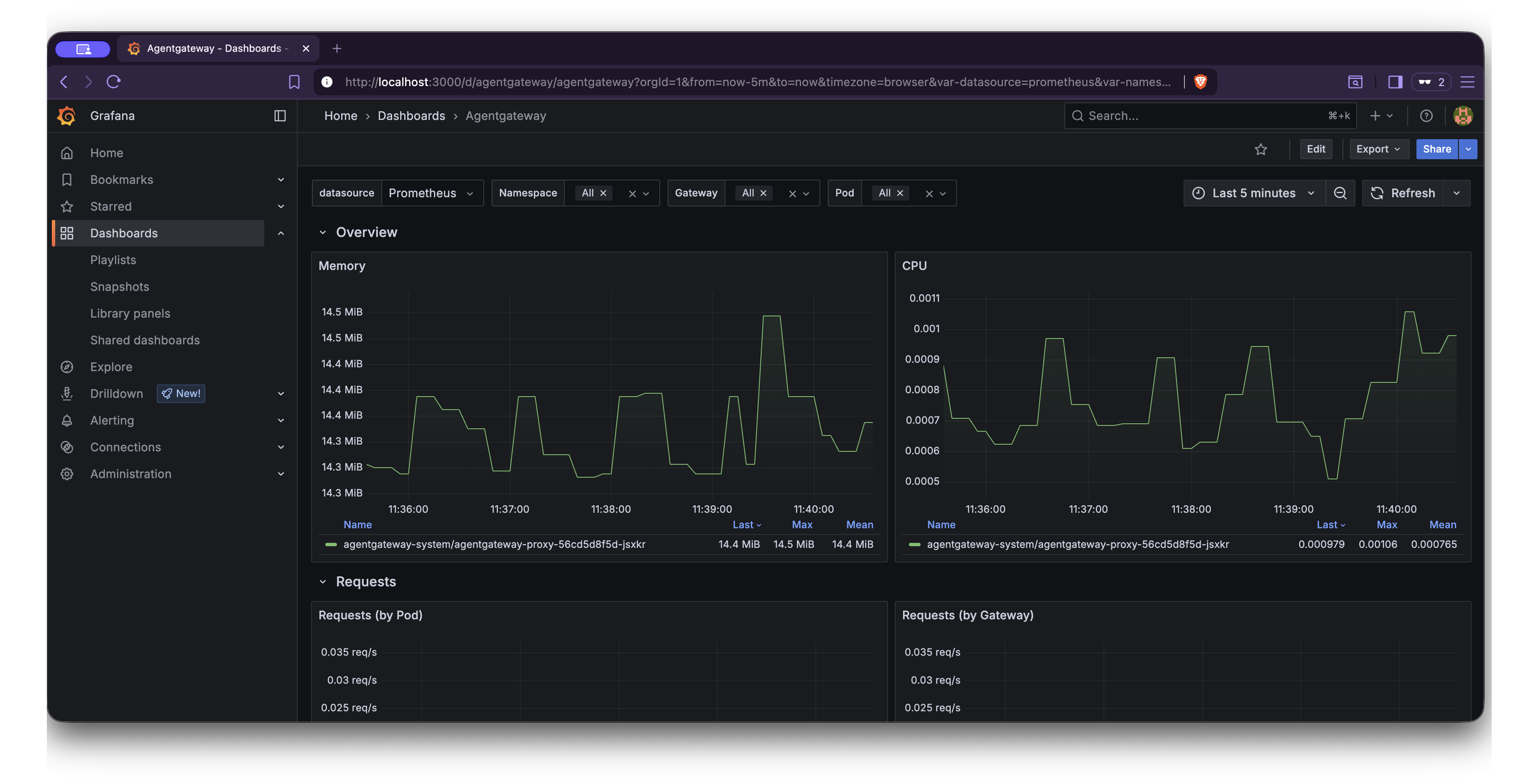
Section Metric Description Overview Memory The working set memory that each agentgateway proxy pod consumes. Overview CPU The CPU usage rate for each agentgateway proxy pod. Requests Requests (by Pod) The request rate that each agentgateway proxy pod handles. Requests Requests (by Gateway) The request rate for each gateway. Requests Requests (by Status) The request rate grouped by HTTP response status. Requests Requests (by Reason) The request rate grouped by the response reason. LLM Token Consumption The rate of tokens that LLM requests consume, grouped by token type, model, and gateway. LLM Time To First Token The time that it takes the LLM provider to return the first token of a response. LLM Request Time The total duration of LLM requests. LLM Tokens Per Second The rate at which the LLM provider returns output tokens. MCP MCP Calls (by method) The rate of MCP requests grouped by JSON-RPC method. MCP Tool Calls (by tool) The rate of MCP tool calls grouped by server, resource, and tool. Latency Latency by Route The 50th, 95th, and 99th percentile request latency for each gateway and route. XDS XDS Messages by Type The rate of xDS configuration messages that the control plane sends, grouped by resource type. XDS XDS Average Message Size The average size of xDS messages, grouped by resource type. Runtime Cgroup Memory The cgroup memory usage for each agentgateway proxy pod, such as working set, anonymous, file, and kernel memory. Runtime Process Memory The process-level memory for each agentgateway proxy pod, such as RSS, PSS, private, shared, and swap memory. Runtime Tokio Runtime The async runtime statistics for each agentgateway proxy pod, such as the worker count, number of alive tasks, and global queue depth. Runtime Build Versions The agentgateway build versions that are running, grouped by tag.
Cleanup
You can remove the resources that you created in this guide.Remove the configmap for the Envoy gateway proxy dashboard and delete the
envoy.jsonfile.kubectl delete cm agentgateway-dashboard -n telemetry rm agentgateway.jsonUninstall the Grafana Loki and Tempo components.
helm uninstall loki -n telemetry
helm uninstall tempo -n telemetry
Uninstall the OpenTelemetry collectors.
helm uninstall opentelemetry-collector-metrics -n telemetry
helm uninstall opentelemetry-collector-logs -n telemetry
helm uninstall opentelemetry-collector-traces -n telemetry
Uninstall the Prometheus stack.
helm uninstall kube-prometheus-stack -n telemetryRemove the
telemetrynamespace.kubectl delete namespace telemetry